Podpora #386
open
Maps rendering issue
Podpora #386:
Maps rendering issue
Status:
Nová
Priority:
Normálna
Assignee:
-
owner-email:
ar@adventure.gg
Device model:
Pixel 10 Pro
OS version:
Android 17
App name and version:
GPX Viewer Pro 1.52.1
Description
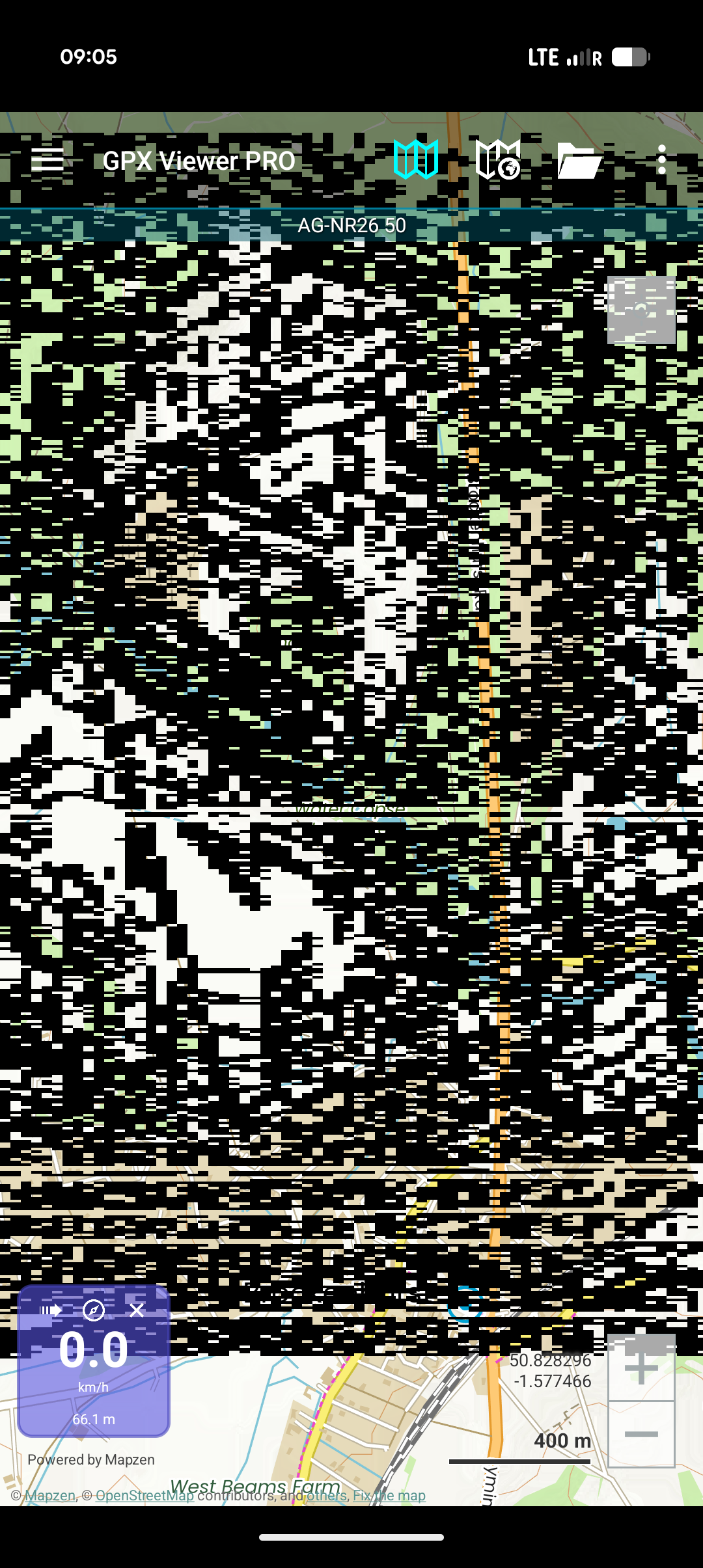
When viewing, scrolling and zooming maps it will suddenly start displaying random black patterns on my screen.
It requires killing and restarting the app for it to display correctly again but quickly starts displaying the black patterns again.
Files
Updated by Anonymous 2 days ago
It seems to do this when GPX files are loaded
Updated by Anonymous 2 days ago
Hello,
thank you for reaching out to us. We are sorry you are having issues with GPX Viewer PRO. Please try uninstalling the app, restarting your device and installing it again. If this doesn't solve the issue, could you please send us a screen recording showing how you open a track, scroll and zoom maps and then black patterns appear? This would help us to inspect the issue.
Kind regards,
Olga Belaya