Podpora #386
open
Maps rendering issue
Description
When viewing, scrolling and zooming maps it will suddenly start displaying random black patterns on my screen.
It requires killing and restarting the app for it to display correctly again but quickly starts displaying the black patterns again.
Files
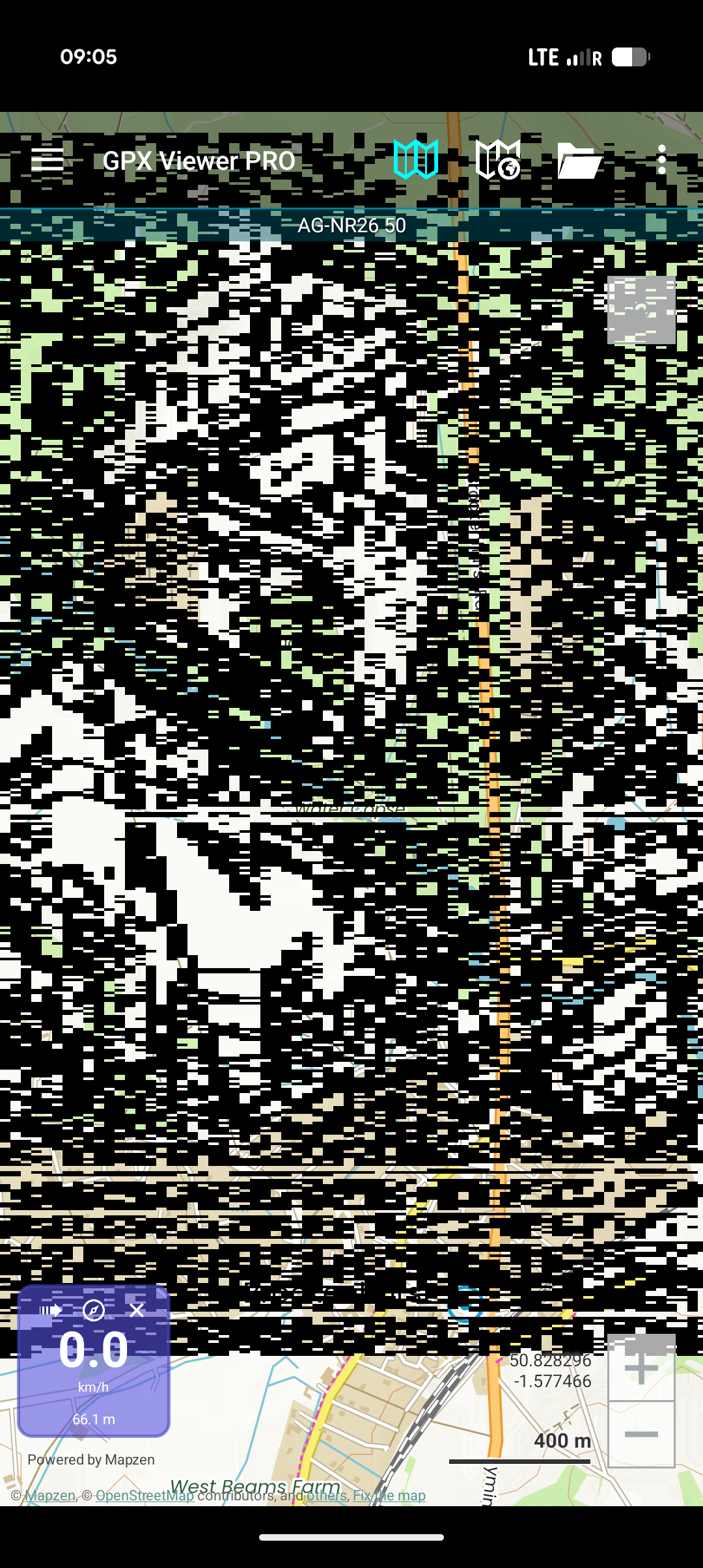
Updated by Anonymous 22 days ago
It seems to do this when GPX files are loaded
Updated by Anonymous 22 days ago
Hello,
thank you for reaching out to us. We are sorry you are having issues with GPX Viewer PRO. Please try uninstalling the app, restarting your device and installing it again. If this doesn't solve the issue, could you please send us a screen recording showing how you open a track, scroll and zoom maps and then black patterns appear? This would help us to inspect the issue.
Kind regards,
Olga Belaya
Updated by Anonymous 7 days ago
Hello,
we noticed that on your screenshot you are using offline maps, could you please try turning off the Hillshade and Contours options for the offline map style you are currently using? To do this, tap the map icon without the globe in the top menu, then tap the palette icon to the right of your active map style, and toggle off both settings. Please let us know if this helps resolve the issue with displaying random black patterns.
Kind regards,
Olga Belaya